
You commit a build script. Dave runs it on his machine. It fails - his Delphi is in D:\Delphi13, not C:\Program Files (x86)\Embarcadero\Studio\23.0. You fix it for Dave. Six months later, Delphi 14 ships, the script breaks again.
Hand-maintained .inc files have the same problem, only more painful. Has this happened to you? A new Delphi release lands, and you spend the time to install RAD Studio and configure your paths for any third party libaries. After struggling to remember how everything gets configured and built (“someday I’ll automate this” you say to yourself) it appears that two of your component libraries fail to build because some .inc file doesn’t recognize the new VER### define. You either check to see if the vendor has a new install which is compatible with the latest release - or (if you have the source) you manually track down one or more .inc files that you have to tweak to get a successful build because they weren’t written to automatically support new versions. If you upgrade multiple third party libraries and update Delphi at the same time, the risk of something breaking jumps considerably.
These look like multiple problems. They are actually the same one: compiler version information is data, and we keep treating it as code and hardcode datapoints into scripts, conditionals, and tooling.
The data file
delphi-compiler-versions is a small repo built around a single JSON file. Each Delphi release gets one entry. Here’s a snippet of the current version definition:
1
2
3
4
5
6
7
8
9
10
11
12
13
14
{
  "verDefine": "VER370",
  "compilerVersion": "37.0",
  "productName": "Delphi 13 Florence",
  "packageVersion": "370",
  "regKeyRelativePath": "\\Software\\Embarcadero\\BDS\\37.0",
  "supportedBuildSystems": ["DCC", "MSBuild"],
  "supportedPlatforms": ["Win32", "Win64", "macOS64", "macOSARM64", "iOS64", "iOSSimulator64", "Android32", "Android64", "Linux64", "WinARM64EC"],
  "aliases": ["Delphi 13", "Florence", "13 Florence"],
  "notes": [
    "RAD Studio 13 unifies internal version numbers to 37 (registry, RTL, packages).",
    "Update 1 for RAD Studio 13 Florence added support for WinARM64EC"
  ]
}
The data goes back to Delphi 2 (VER90) from the Borland-era. The registry paths track the Borland -> CodeGear -> Embarcadero transitions across the decades. The platform list is the union across the version family, with the notes calling out which platforms were introduced in which point release (10.3 Update 2 added macOS64, 10.3 Update 3 added Android64, that level of detail).
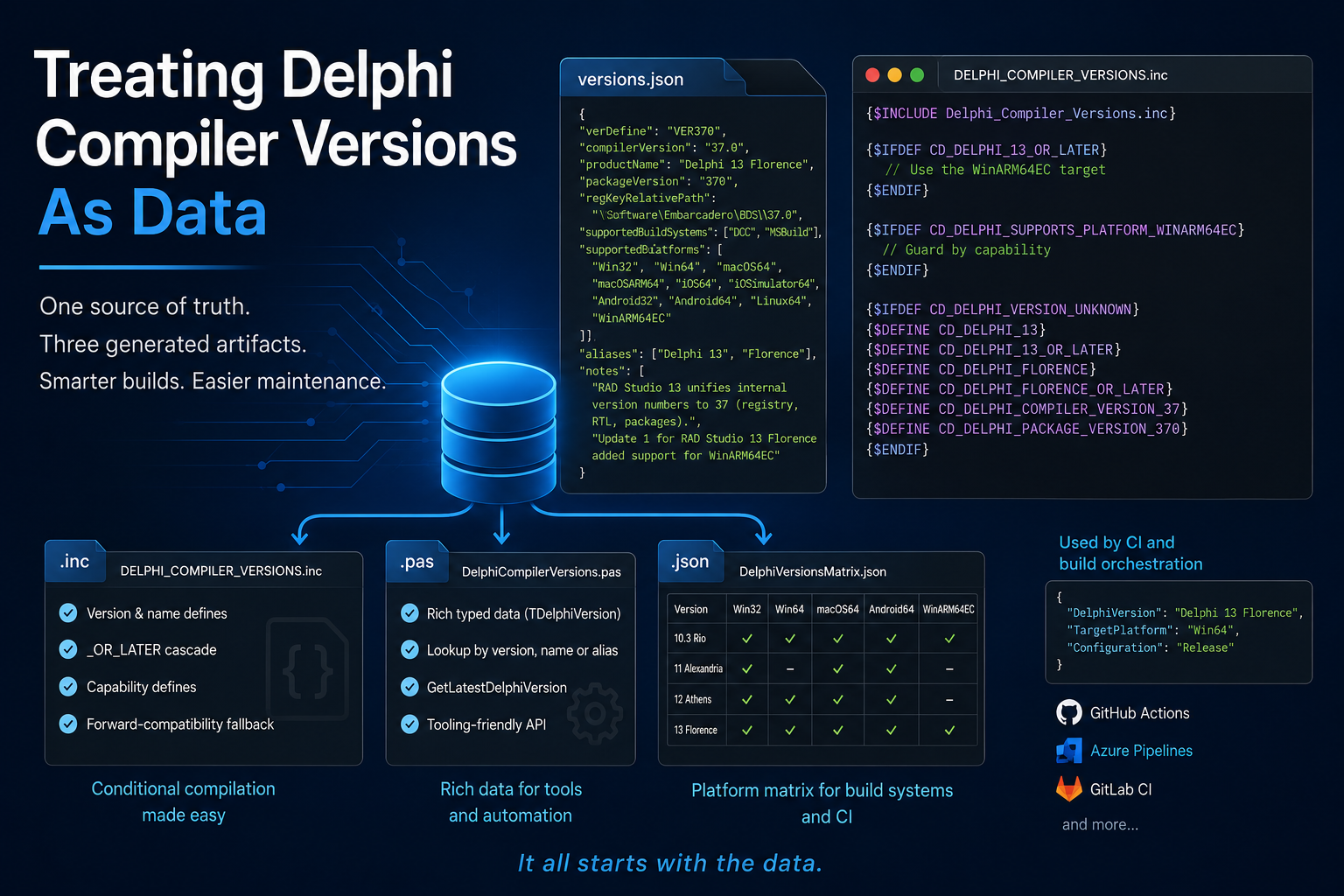
From that one file, three artifacts get generated. Tests validate that the generators match the data.
#1: The Include File
DELPHI_COMPILER_VERSIONS.inc is what most Delphi devs are going to drop into their project. Every recognized VER### gets translated into a set of CD_ defines you can guard against:
1
2
3
4
5
6
7
8
9
10
11
12
13
{$INCLUDE DELPHI_COMPILER_VERSIONS.inc}

{$IFDEF CD_DELPHI_13_OR_LATER}
  // Use the WinARM64EC target
{$ENDIF}

{$IFDEF CD_DELPHI_FLORENCE_OR_LATER}
  // Same as above, simply use the named version if you prefer
{$ENDIF}

{$IFDEF CD_DELPHI_SUPPORTS_PLATFORM_WINARM64EC}
  // Or guard against the capability directly, regardless of version
{$ENDIF}
The CD_ prefix is for Continuous-Delphi, my organization devoted to Delphi tooling and automation. I went back and forth on whether to add a prefix - CD_DELPHI_13_OR_LATER is not as pretty as DELPHI_13_OR_LATER - but it’s deliberate to avoid namespace collisions.
Three things worth pointing out about this generated file:
It’s been tested against Delphi 2 and up. If you maintain a codebase that spans multiple Delphi generations, the symbols are stable across all of them and the file is usable as-is in any Delphi version.
The _OR_LATER cascade is wired up. On Delphi 13, CD_DELPHI_13_OR_LATER is defined, and so is CD_DELPHI_12_OR_LATER, CD_DELPHI_11_OR_LATER, and so on all the way down. You guard against the minimum version you need, not every version above it.
The forward-compatibility block is the part I’m most happy with. When Embarcadero ships a future Delphi with a new VER### define, the .inc has no way to recognize it - but instead of failing or going inert, it falls through to a block that inherits the defines of the latest known version:
1
2
3
4
5
6
7
8
{$IFDEF CD_DELPHI_VERSION_UNKNOWN}
  {$DEFINE CD_DELPHI_13}
  {$DEFINE CD_DELPHI_13_OR_LATER}
  {$DEFINE CD_DELPHI_FLORENCE}
  {$DEFINE CD_DELPHI_FLORENCE_OR_LATER}
  {$DEFINE CD_DELPHI_COMPILER_VERSION_37}
  {$DEFINE CD_DELPHI_PACKAGE_VERSION_370}
{$ENDIF}
CD_DELPHI_VERSION_UNKNOWN stays defined so callers that care can detect the fallback. Most won’t care - they just want their code to keep compiling on the new compiler without anyone having to patch their dependencies first.
This is the piece that means you do not have to update the .inc every time a new Delphi ships. The canonical data file in this repo still gets updated when a new release lands (that’s where the platform metadata lives), but the .inc file you have pulled into your project keeps working. That has been my biggest pet peeve with hand-maintained .inc files in third-party libraries: every release, somebody has to scramble to patch them, and your build fails until they do. With this design, the patching only needs to happen in one place.
#2 The Source File
DelphiCompilerVersions.pas is for devs writing Delphi tooling, not just Delphi applications. It exposes the same data as types and a DelphiVersions: array[0..26] of TDelphiVersion constant, plus four lookup functions:
1
2
3
4
5
6
7
8
9
10
function TryGetDelphiVersionByVerDefine(const AVerDefine: string;
  var AVersion: TDelphiVersion): Boolean;

function TryGetDelphiVersionByProductName(const AProductName: string;
  var AVersion: TDelphiVersion): Boolean;

function TryGetDelphiVersionByAlias(const AAlias: string;
  var AVersion: TDelphiVersion): Boolean;

function GetLatestDelphiVersion: TDelphiVersion;
Here’s an excerpt from another project I’m working on, showing what consuming this unit looks like in practice:
1
2
3
4
5
6
7
8
9
10
11
12
13
14
15
16
17
18
19
20
function TBuildContext.Reset(const ADelphiVersion: string;
  const ATargetPlatform: TDelphiPlatform): Boolean;
begin
  if ADelphiVersion.IsEmpty then
  begin
    DelphiVersion := GetLatestDelphiVersion;
  end
  else
  begin
    if (not TryGetDelphiVersionByProductName(ADelphiVersion, DelphiVersion)) and
       (not TryGetDelphiVersionByAlias(ADelphiVersion, DelphiVersion)) and
       (not TryGetDelphiVersionByVerDefine(ADelphiVersion, DelphiVersion)) then
    begin
      DelphiVersion := Default(TDelphiVersion);
      Result := False;
    end;
  end;
  CompilerOptions.InitDefaults(DelphiVersion, TargetPlatform);
  // ...
end;
A user can pass any of Delphi 13, Florence, 13 Florence, or VER370 (whichever naming style you prefer) and the lookup resolves to the same record. Pass nothing and you get the latest known version. Three lookup styles plus a default, with no string-parsing logic to maintain anywhere in the consuming code.
#3 The Platform Support Matrix
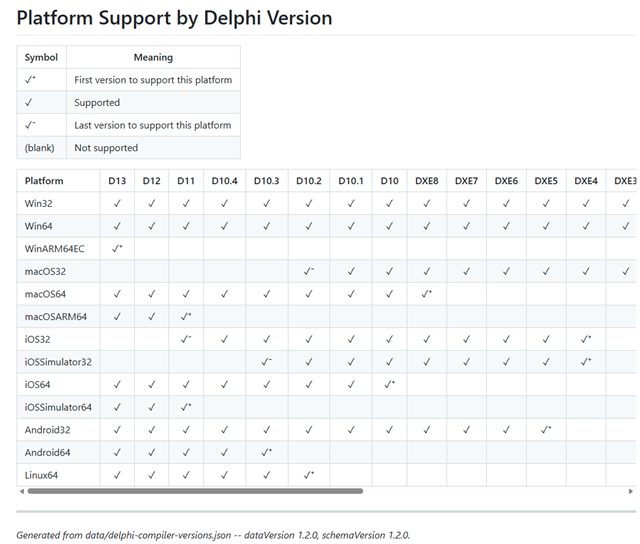
PlatformSupport.md is the visual reference. It is a single markdown table - platforms down the rows, Delphi versions across the columns, with markers showing which version a platform was first supported in and which version was the last to support it. macOS32 dropped after 10.3 when Catalina removed OS-level 32-bit support; iOS32 dropped after 10.4 when Apple killed it from Xcode; macOSARM64 arrived in 11 with Apple Silicon; WinARM64EC arrived in 13. That kind of thing.
It is useful as a standalone reference even if you never touch the .inc or the .pas. If you ever need to remember whether iOSSimulator64 is available on Delphi 11, the table answers it in two seconds.
View the current matrix in the repo.
Why three artifacts from one file matters
When Embarcadero ships Delphi 14, one JSON entry gets added. Every artifact regenerates from that single change: the .inc grows new defines, the .pas array gains an entry, the matrix gains a column. Tests validate that the generated output matches the data. The release process is reproducible.
This matters more than it sounds, because the data file is also consumed downstream. delphi-inspect, a PowerShell tool that discovers installed Delphi versions on a machine, embeds a snapshot of the JSON via submodule and a single update script. When the canonical data updates, delphi-inspect pulls forward. When delphi-inspect releases, anything using delphi-inspect picks up the refresh.
That’s the part that pays for the design. Here’s a one-liner that answers “build my project on whatever Delphi is latest on this machine”:
1
pwsh delphi-inspect.ps1 -DetectLatest -Platform Win64 -BuildSystem MSBuild
The output of that can be piped into delphi-msbuild to actually run the build, and the same script will work on your machine, on Dave’s machine where Delphi is in D:\Delphi13, and on the CI runner. No hardcoded paths. No “edit this line for your environment” comments.
The declarative version of the same thing lives in CI pipeline config:
1
2
3
4
5
6
7
8
9
10
11
12
13
14
15
{
  "action": "build",
  "engine": "MSBuild",
  "toolchain": { "version": "Latest" },
  "platform": "Win64",
  "verbosity": "minimal",
  "jobs": [
    {
      "name": "Win64 Test project (Debug)",
      "projectFile": "test/Delphi.Lexer.Tests.dproj",
      "configuration": "Debug",
      "defines": ["CI"]
    }
  ]
}
"version": "Latest" resolves through the same data. The pipeline runs on any machine, with any Delphi install, in any path.
delphi-compiler-versions is MIT licensed. Drop the .inc into your project as a copy or via submodule. Use the .pas if you are building Delphi tooling that needs the version metadata at runtime. Reference the matrix when you want a quick lookup on platform availability.
It all starts with the data.